
Microsoft 365 Copilot Workshop
Prompts, reference notes, and sample datasets for the 2-day Microsoft 365 Copilot workshop.
Participant book: download the whole workshop as one PDF, with every topic’s notes and prompts, to read offline or print.
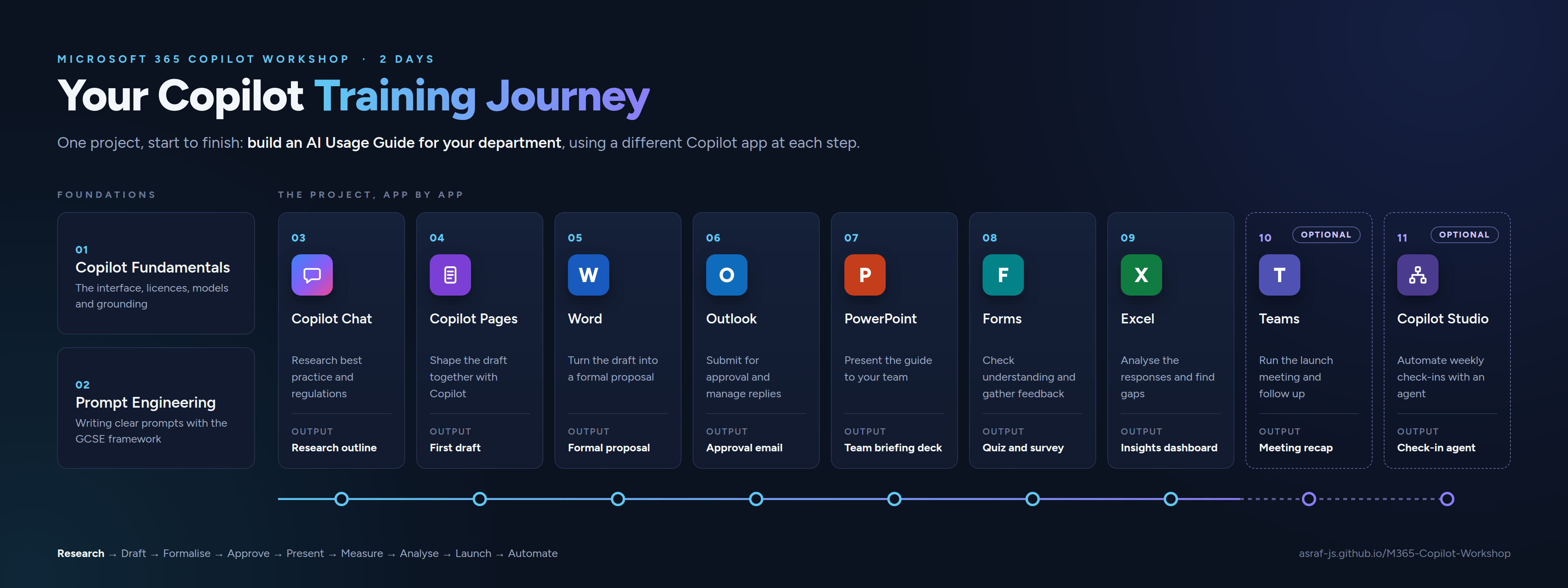
Program Flow
How to Use This Site
Each topic has a Notes page covering the concepts and a Prompts page with copy-paste prompts you can use during and after the session.
To copy a prompt: open the prompts file, find the prompt you want, and click the copy icon on the top right of the code block.
Download: all workshop files (ZIP). Save the ZIP, then right-click it and choose Extract All before you open any file.
Workshop Scenario
Throughout this workshop you work on one connected project from start to finish.
You are creating an AI Usage Guide for your department.
This guide will explain how your team should use AI tools responsibly and effectively. Each topic moves the project one step forward:
| Stage | What happens |
|---|---|
| Research | Use Copilot Chat to research AI best practices, regulations, and department-specific use cases |
| Draft | Move your research into Copilot Pages and build the first draft of your guide |
| Refine | Open the draft in Word and reformat it as a formal management proposal |
| Submit | Email the proposal to your supervisor for approval using Copilot in Outlook |
| Present | Turn the approved document into a team presentation using Copilot in PowerPoint |
| Survey | Build a knowledge quiz and feedback survey using Copilot in Forms |
| Analyse | Use Copilot in Excel to analyse the quiz results and surface insights |
| Launch | Run the launch meeting in Teams, with Copilot capturing questions, decisions and follow-ups |
| Automate | Build a simple weekly check-in agent in Copilot Studio to keep the feedback loop running |
Topics
| # | Topic | Notes | What you will do |
|---|---|---|---|
| 01 | Copilot Fundamentals | Prompts | Check your license, tour the interface, run your first prompt, personalise Copilot, verify sources, compare models, save prompts, and ground answers in your own files |
| 02 | Prompt Engineering | Prompts | Learn the GCSE framework, practice writing better prompts, and understand how to iterate on responses |
| 03 | Copilot Chat | Prompts | Research AI best practices and Malaysian regulations using Web grounding, then switch to Work mode to reference your own documents |
| 04 | Copilot Pages | Prompts | Turn your research into a structured first draft, refine it section by section, and add a Mermaid decision flowchart |
| 05 | Copilot in Word | Prompts | Reformat your draft as a formal management proposal, strengthen key sections, and create a cover summary page |
| 06 | Copilot in Outlook | Prompts | Email the proposal for approval, follow up, respond to feedback, tidy your inbox with rules, schedule the launch meeting, and announce the approved guideline to your team |
| 07 | Copilot in PowerPoint | Prompts | Generate a team presentation from your Word document, improve slides, add speaker notes, and create custom images using the Create feature |
| 08 | Copilot in Forms | Prompts | Build a knowledge quiz from your AI Usage Guide PDF and a feedback survey, then export the results to Excel |
| 09 | Copilot in Excel | Prompts | Analyse quiz results, add calculated columns, identify weak areas by department, and use Python in Excel to generate charts |
| 10 | Copilot in Teams | Prompts | Run the launch meeting for your guide with Copilot and Facilitator, use the recap to follow up, and catch up on busy chats |
| 11 | Copilot Studio Intro | Prompts | Build a simple weekly check-in agent that asks your team one question about the AI guideline and collects their response |
Sample Data
The file AI_Guideline_Survey_Responses.xlsx in the Excel folder contains 100 simulated quiz responses across 8 departments for use in Topic 09. You do not need real responses to complete the Excel exercises.
The file Data_Privacy_AI_Acceptable_Use_Policy.pdf in the Copilot Chat folder is a fictional company policy document used in Topic 03 to practise Work mode grounding.
Last updated: May 2026 | Trainer: Asraf